The Reviewing/Updating
Submissions page allows you to review any claim submissions you've made
to the Office of Insurance Regulation, print those submissions, and update
the submissions in the Workbench for later re-submission.
To review your previously submitted closed claim forms and aggregate
reports:
Click
the Review Submissions link from
the PLCR Workbench task bar. The
Review Submissions page will display.
Select
a previously submitted Closed Claim or Aggregate Report you wish to review
by clicking the Claim Number next to the Closed Claim or Insurer Name
of the Aggregate Report.
The Review Submissions
Page
Upon selecting a closed
claim or aggregate report to review, the Submission review Details Page
will display. At
this point you may review the details of each section of your closed claim
or aggregate report.
The Submission Review Details Page
If you find all the details of your claim form
or report are accurate and do not wish to change them, you may choose
to print the review page or return to the PLCR Workbench. To
print the review page, click the Print
button. To
return to the Workbench, click the Return
to Workbench button.
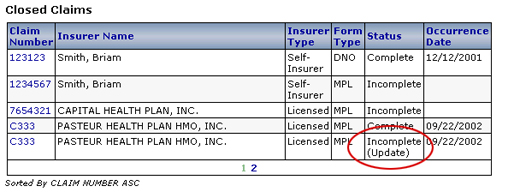
If you would like to update data in your submission
for re-submission you may elect to click the Update
in Workbench button. This
will return your submitted closed claim form or aggregate report back
to the PLCR Workbench with a status of "Incomplete (Update)".
Even though
your form/report was considered complete, it will now be considered Incomplete
until the form has been modified and re-saved.
To update a previously submitted closed claim or aggregate report
Click
the Review Submissions link from
the PLCR Workbench task bar. The
Review Submissions page will display.
Select
a previously submitted Closed Claim or Aggregate Report you wish to update
by clicking the Claim Number next to the Closed Claim or Insurer Name
of the Aggregate Report.
Upon
selecting a closed claim or aggregate report to review, the Submission
review Details Page will display.
Click
the Update in Workbench button.
This will
return your submitted closed claim form or aggregate report back to the
PLCR Workbench with a status of "Incomplete (Update)".
Select
a previously submitted Closed Claim or Aggregate Report you wish to update
by clicking the Claim Number next to the Closed Claim or Insurer Name
of the Aggregate Report.
Update
the Closed Claim or Aggregate Report in the same way that you would create
a new claim form or aggregate report. Note
that each form or report will be marked incomplete until the information
within that form or report has been updated and re-saved.