

Managing OIR StaffOIR Staff management is handled from the Utilities Menu. Existing OIR Staff are the ONLY classification of user that will be able to access this menu. Clicking the Manage OIR Staff Role Authorizations link will take the user to a menu which will allow for revocation of OIR status as well as granting of OIR status.
Figure 1.1
Revoking Current OIR Privileges
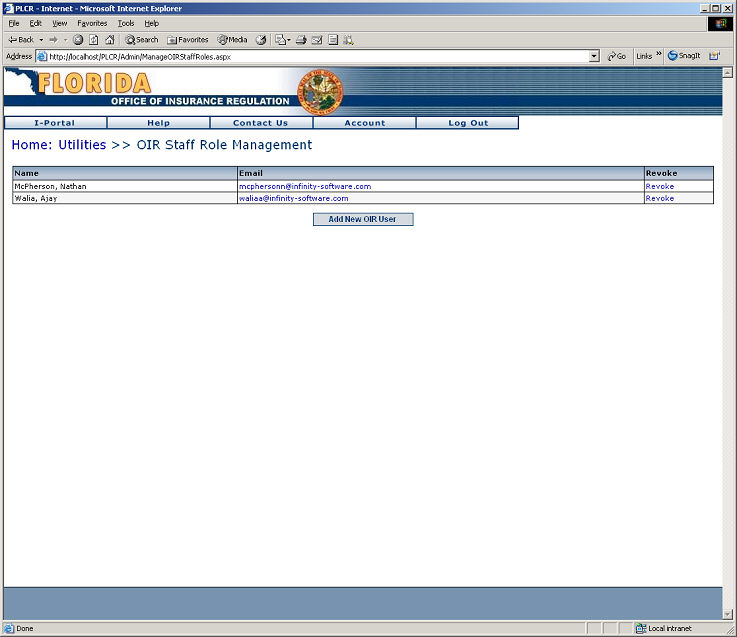
The next page shows a list of the users that are currently authorized as OIR Staff. From this screen an OIR Staff can revoke the privileges of any user in this list. In order to Revoke an OIR Staff's privilege simply click the Revoke Hyperlink.
Figure 1.2
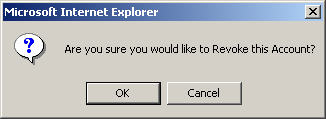
After the Revoke Hyperlink has been clicked the user attempting the revocation will receive the following prompt. Selecting OK will revoke the user's OIR privilege. Selecting Cancel will abort the revocation of the selected user.
Regardless of which action is chosen the user will be redirected to the OIR Staff List and if a revocation occurred the user that was revoked will NOT appear in the OIR User List. If the revocation action was cancelled, then no modifications to the list will be made.
Adding an OIR Staff
Adding an OIR Staff is contingent upon the following conditions: (1) the user MUST exist as a valid portal user and (2) the e-mail entered must be a valid e-mail address. If the user does not exist you will receive an error message as seen below:
Figure 1.3
When a user has been successfully added you will be redirected to the OIR Staff List, and will be able to see your added record(s).
Figure 1.4 |
|
|