
Florida Department of Financial Services
Create a New Submission
Introduction: Creating a New Submission
The Submission Wizard will guide you step-by-step through creating a new submission. The Submission Wizard allows you to submit data and review the data before submitting it to the Office of Insurance Regulation.
Select Submission Type
Click on the Create Submission link from the WCCS Workbench task bar. Another Create Submission link is found in the paragraph above the Pending Submission(s) table. The Select Type of Submission screen will be displayed.
Select a data type by clicking on the radio button next to the appropriate choice: Individual or Group.
WCCS: Select Type of Submission Screen
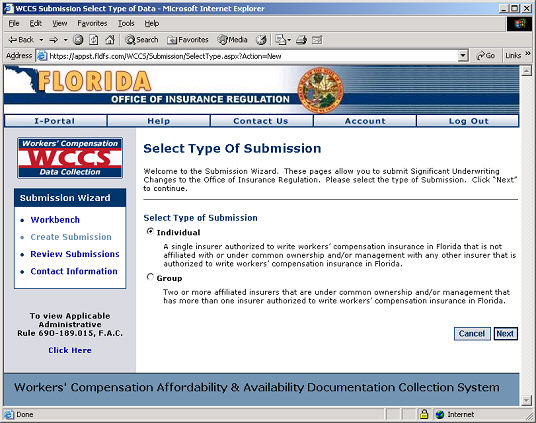
Click the Next button.
Next Step:
If you are submitting Individual
Data then click here.
If you are submitting a Group Data, then click here.