
Florida Department of Financial Services
Create a New Submission
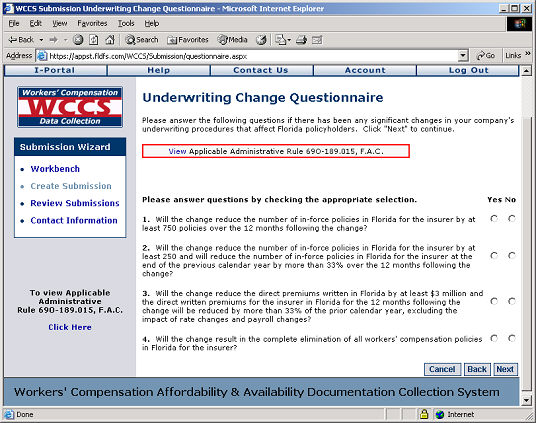
Underwriting Change Questionnaire
Respond to each of the four questions provided in the questionnaire displayed on the screen. Each question requires a 'Yes' or 'No' response, which can be selected by clicking the radio button under the respective Yes/No columns.
Once you have provided responses for each question, click Next to continue.
If you answer 'Yes' to any of the four questions, click here to visit the Select Insurer help screen for more information.
If you answer 'No' to all four questions, proceed to step 13.
WCCS: Underwriting Change Questionnaire Screen
Next Step:
If you responded 'Yes' to any questions, go to Select Insurer.